

Key Takeaways
- Keep your screen 20 to 28 inches away and at or slightly below eye level.
- Match your screen brightness to the light in your room to reduce glare.
- Use the 20-20-20 rule and blink often to keep your eyes comfortable.
- Sit with good posture and put screens away an hour or two before bed.
- An optometrist in Whitehorse can check your eyes and suggest drops or computer glasses.
By the end of a long workday, your eyes might feel dry, tired, or a little blurry. Perhaps a dull headache starts to settle in behind your forehead. We hear about these screen-related complaints quite a bit here at Northern Lights Optometry.
When you spend hours in front of a monitor, you naturally blink less, and your eyes work hard to stay focused on something close up. It is a common challenge, but you don’t have to just live with the discomfort. You can reduce digital eye strain by making a few simple adjustments to your desk, your lighting, your daily habits, and by getting support from your eye care team when you need it. Here are 10 tips to help your eyes feel refreshed and ready for your day.
Desk Setup and Room Light Basics
Position the Monitor Correctly
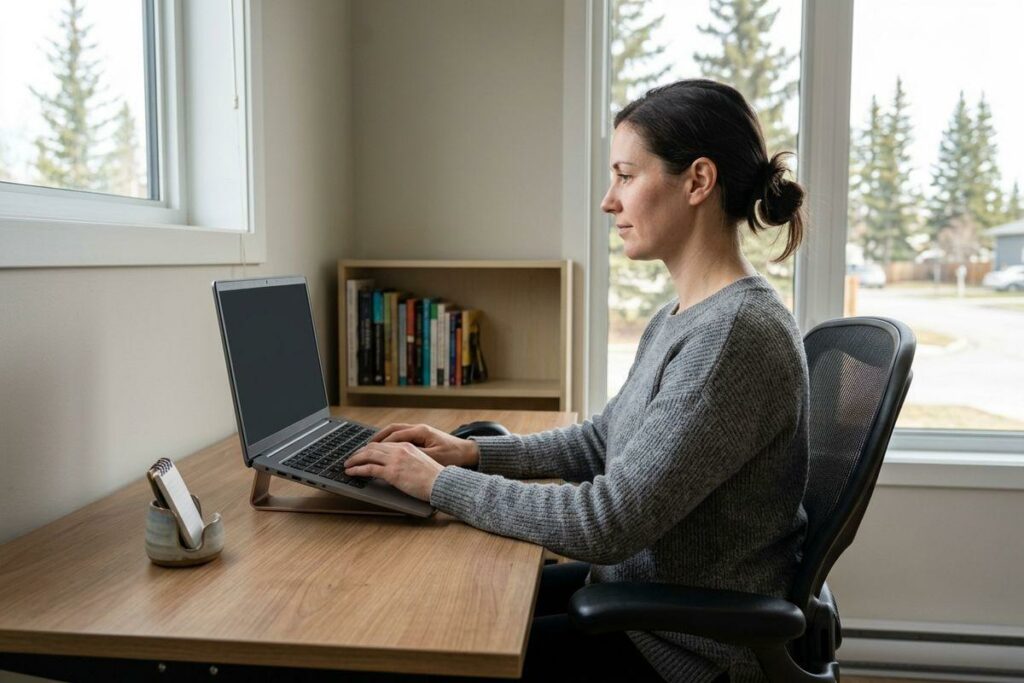
Where you place your screen makes a big difference. Keep it 20 to 28 inches from your face, about an arm’s length away. Set the top of the monitor at or slightly below eye level so your gaze drops just a touch.
That small drop matters even more if you wear progressive glasses, since it lets you look through the right part of the lens without tipping your head back. An adjustable chair can also help you hold that position comfortably all day.
Adjust the Overhead Light
Harsh light from above can bounce off your screen and tire your eyes. Soften overhead lighting when you can.
Position your screen so it sits beside a window rather than facing it. If sunlight pours in, close the blinds to cut the glare quickly and easily.
Device Display and Vision Adjustments
Balance Screen Brightness
A screen that glows much brighter than the room around it forces your eyes to keep adjusting. Match your screen brightness to the light in your space so the two feel even.
Turn on the auto brightness feature on your phone, tablet, or laptop to let it adjust for you. A matte filter laid over the screen can also stop reflections from washing out what you see.
Increase Font Size and Contrast
Squinting at tiny text is a fast way to wear yourself out. Make the font larger so you can read without leaning in.
Black text on a white background gives you clean, sharp contrast during the day. At night, switch to dark mode so the screen feels softer in low light.
Simple Tricks to Rest Your Eyes
Practice the 20-20-20 Rule
Your eyes need short breaks from close-up focus. Every 20 minutes, look away from your screen at something about 20 feet away, like a doorway or a tree outside the window. Hold that gaze for a full 20 seconds before you return to work. This gives the focusing muscles in your eyes a quick chance to relax.

Blink More Often
You blink far less when you stare at a screen, and that leaves your eyes feeling dry. Watch for these signs:
- Redness around the eyes
- Blurry vision that comes and goes
- A gritty or tired feeling
Make a habit of blinking more often to keep your eyes naturally moist. Step away from your desk now and then to stretch and let your eyes reset.
Posture and Nighttime Routines
Sit With Proper Posture
How you sit shapes how your whole body feels by 5 PM. Keep your feet flat on the floor and your back comfortably straight, not hunched toward the screen. Rest your elbows at about a 90-degree angle so your shoulders stay loose.
Power Down Before Bed
Screens late at night can leave your mind buzzing when you want to wind down. Try to stop using them 1 to 2 hours before sleep.
Reach for a printed book instead of scrolling, and dim the lights around you. These small steps help your body ease into rest.
Professional Support
Use Eyewear or Eye Drops
Sometimes, your eyes need a little extra help to stay comfortable during a long day. If you find your eyes feeling dry, try using artificial tears to refresh them, especially since your blink rate naturally drops while you work at a screen. If you wear contacts, switching to glasses at your desk can also provide some much-needed relief. Additionally, computer glasses can be a great way to block harsh glare and make long hours at the monitor feel significantly easier on your eyes.
Schedule an Eye Exam
Headaches and tired eyes that keep coming back are worth a closer look. A thorough eye exam checks how your visual system is working and can spot anything that needs attention. If you spend most of your day on a computer, our team can talk through dry eye options that fit your routine.
We Are Here for You
If you spend most of your day at a computer, our team at Northern Lights Optometry is here to help you find lasting comfort. We’ve been part of this community for generations, and we’re always happy to see you. Book your exam today and let our local team support your vision.